



If you run a school with, say, 3,200 students.
Attendance is tracked in Excel. Fee reminders go out on WhatsApp. Parent complaints arrive through a personal email account that three different staff members share.
Report cards take your admin team three weeks to produce. By hand.
If this sounds familiar, you are not alone. Most schools are running complex institutions on tools that were never designed for them.
Good school management software fixes that. It pulls every operational thread- students, teachers, parents, fees, timetables, attendance, grades, into one place that everyone can actually use.
Here is what building it involves.

What School Management Software Actually Does
Think of it as the operating system for a school.
Not just a database. Not just a communication tool. A platform that connects every person and every process: students, teachers, parents, administrators, finance teams, so information flows between them without someone having to manually copy it from one place to another.
Done well, a teacher marks attendance on their phone at 8:05 AM. By 8:07 AM, a parent gets a notification that their child is not in class. The office does not have to call anyone.
Done badly, it is one more login screen that staff resent, parents ignore, and administrators work around.
The difference between those two outcomes is almost always decided before a line of code is written.
Why This Market Is Growing Fast
Schools are under more administrative pressure than ever.
The global school management software market is projected to grow from $20.18 billion in 2025 to $23.9 billion in 2026 at 18.4% CAGR, reaching $42 billion by 2030.
The drivers are real. Rising student enrollment. Growing parent expectations for digital communication. Compliance requirements that spreadsheets cannot handle. And an entire generation of school administrators who have watched every other part of their life go digital while still printing attendance sheets.
Schools that have moved to proper school management systems report fewer administrative errors, faster fee collection, and significantly better parent engagement. The schools still waiting are falling further behind each year.
Core Features Every School Management System Needs
Before listing features, one thing worth knowing: most systems fail because they tried to do too much on day one.
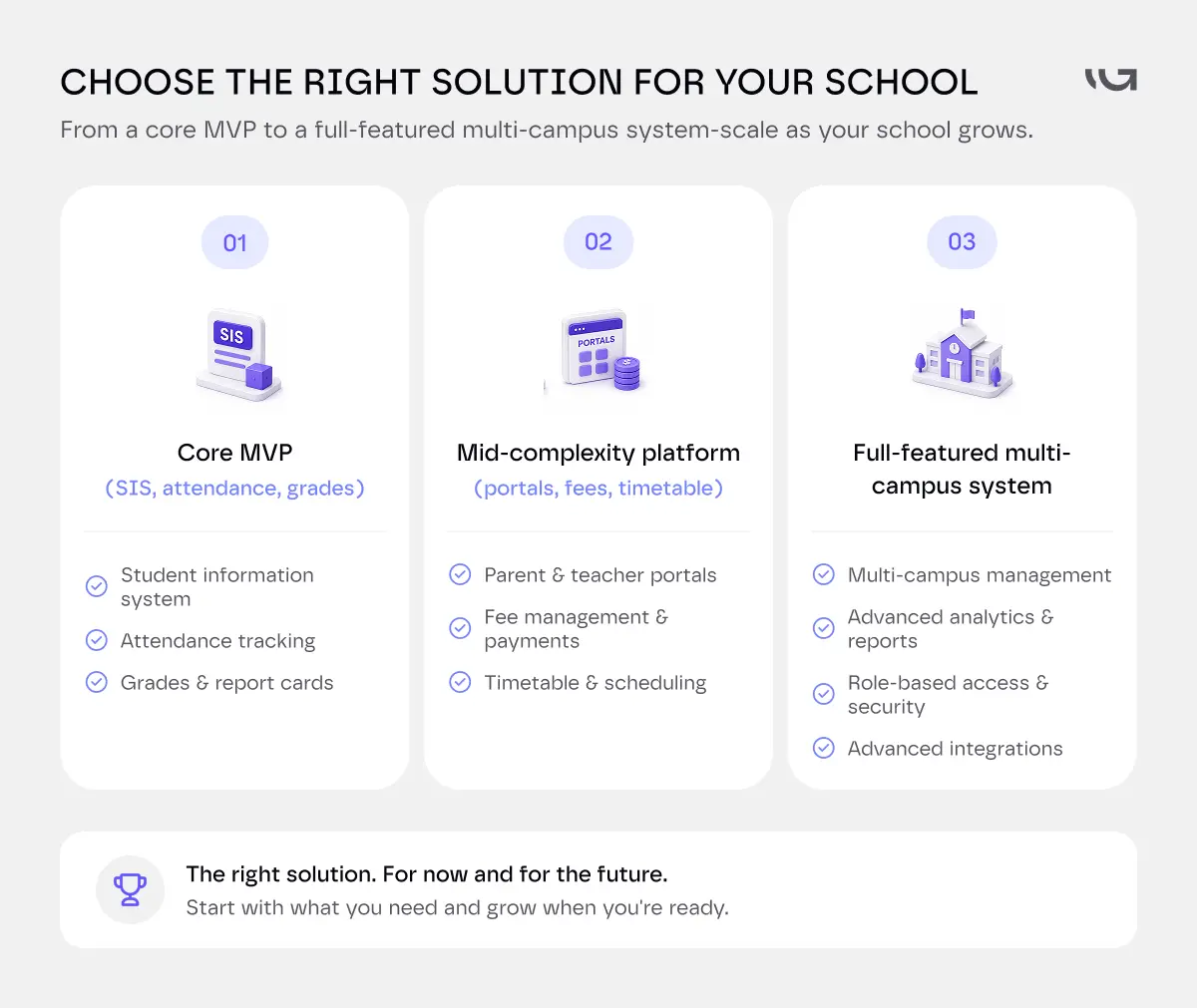
Start with the features that directly replace your most painful manual processes. Add everything else once staff are actually using the system.
Here is how the feature set breaks down.
.webp)
Student Information System- The Heart of Everything
This is the foundation. Every other feature depends on it.
The student information system (SIS) holds every student's record. Personal details, emergency contacts, enrollment history, academic records, health notes, disciplinary records. All in one place, accessible to the right people with the right permissions.
Get this right and everything else becomes easier.
Attendance Management
Manual attendance is one of the biggest time sinks in any school.
A good attendance module lets teachers mark attendance on their phone or tablet at the start of class. It sends automated alerts to parents when a student is absent. It flags patterns- a student missing every Monday, chronic lateness- that would take weeks to notice in a spreadsheet.
For a school with 50 teachers running 6 classes each day, this alone saves hours of administrative work every single day.
Timetable and Schedule Management
Building a timetable for 3,000 students across 80 teachers and 120 classrooms is genuinely complex.
Good scheduling software handles conflicts automatically. A teacher cannot be in two rooms at once. The software enforces these constraints and lets administrators adjust without rebuilding from scratch.
Grades and Academic Records
Teachers enter grades once. Students see them on their portal. Parents see them on theirs. Report cards generate automatically.
Parent and Teacher Portals
Parents want visibility without having to call the office.
A parent portal lets them check their child's attendance, grades, homework, upcoming events, fee balances, and messages from teachers, from their phone, at any time.
Teachers want a simple way to communicate with parents without using personal phone numbers. A messaging module inside the platform handles this and keeps every communication documented.
Fee Management and Billing
A good fee module generates invoices automatically, sends reminders before due dates, accepts online payments, and tracks outstanding balances in real time.
The finance team stops chasing parents. Parents stop claiming they never received the invoice.
For schools processing millions in annual fee revenue, this module alone can justify the entire system.
Library Management
Catalogue management, borrowing records, due date reminders, overdue notices. Libraries that track this manually lose significant numbers of books every year through simple record-keeping failures.
Transport and Route Management
Route mapping, student assignments to routes, driver communication, real-time GPS tracking, and parent notifications when the bus is late or a stop changes.
Schools managing 40 buses across a city need this. Schools with three buses probably do not.
HR and Staff Management
Teacher attendance, leave management, payroll integration, performance records, professional development tracking.
This is often overlooked in school management software builds because the focus goes to the student-facing features. But a school with 200 staff members has a meaningful HR management problem that a good system should solve.
Reports and Analytics
All of this data should tell you something.
Attendance trends by class, by grade, by day of week. Fee collection rates by month. Academic performance patterns across cohorts. Teacher workload distribution.
Not sure which features your school actually needs first?
Most school management software projects go over budget because scope was not defined clearly before development started.
We will sit down with your team, map your actual operational pain points, and tell you honestly which features will deliver the most value in year one.
Book a Free Scope Session.
School Management Software Integrations
A school management system does not run alone. It needs to talk to the tools your school already uses.
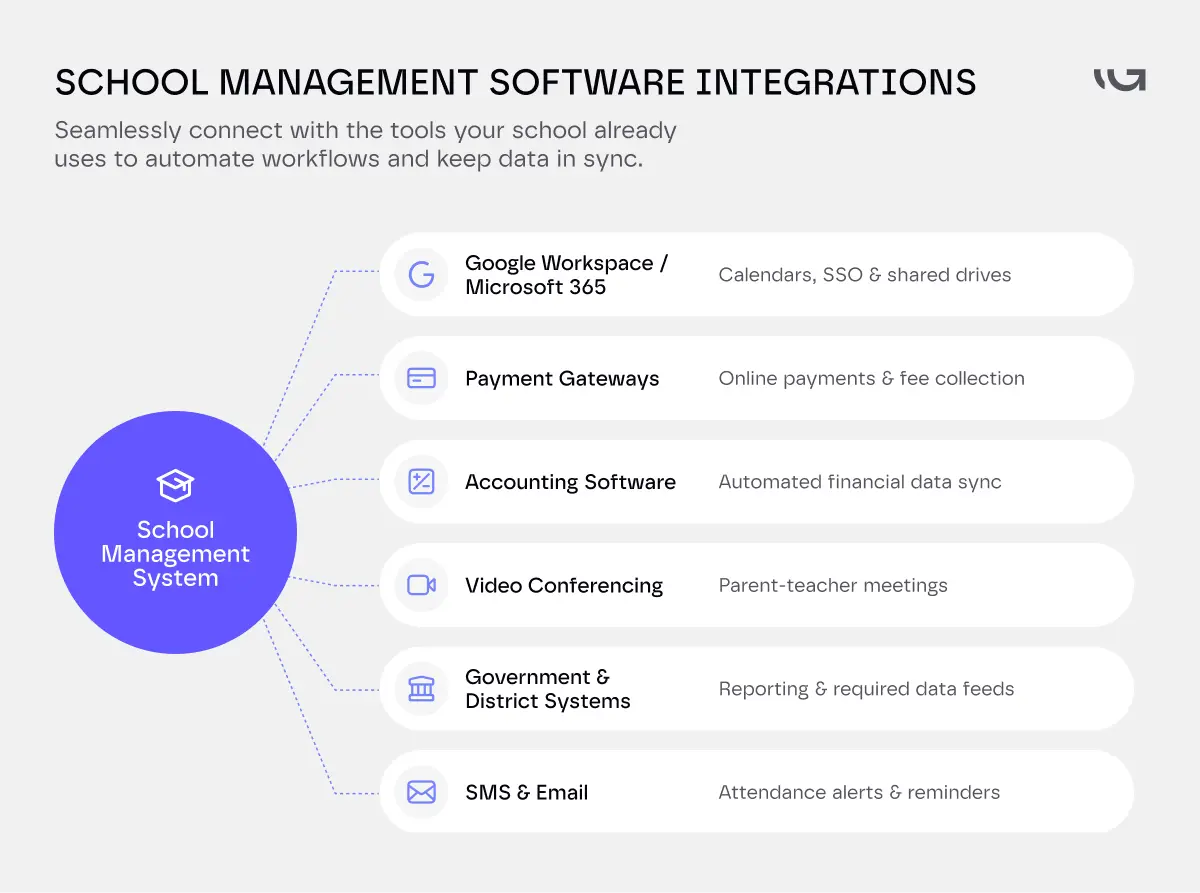
Google Workspace or Microsoft 365. Most schools run on one or the other. Your system should sync calendars, single sign-on, and shared drives, not force staff into a second login.
Payment gateways. Stripe, Razorpay, or a local processor. Fee collection only works if payments settle without manual reconciliation.
SMS and email providers. Alerts need to land on a parent's phone, not sit in an inbox nobody checks.
Accounting software. QuickBooks, Xero, or your finance team's existing system. Fee data should flow into your books automatically. Manual re-entry defeats the point.
Government and district reporting systems. Some regions require data feeds to a state or district portal. Build this in early. Retrofitting it later is expensive.
Video conferencing tools. Zoom or Google Meet, for parent-teacher conferences booked straight through the portal.
Each integration adds scope.
Each one also removes a manual step someone on your staff is doing today.
Prioritize the ones tied to your biggest time sinks first, usually fees and communication.
Teacher and Parent Portals: How to Get This Right
These deserve their own section because they are where most implementations succeed or fail.
A parent portal that parents actually use has four qualities.
It is mobile-first. Most parents will open it on their phone at 7:30 PM after dinner, not on a laptop during office hours. If it is not easy to use on a small screen, it will not get used.
It pushes information to parents rather than waiting for them to log in. Attendance alerts, grade updates, fee reminders, event notification, these should come to the parent, not sit waiting for them to remember to check.
It is genuinely useful on day one. A portal that only has two features live at launch teaches parents that it is not worth opening. Launch with the features parents actually need: attendance, grades, messages, fees.
It respects their time. Every interaction should be fast. If a parent cannot check their child's attendance in under 30 seconds, the experience needs work.
A teacher portal succeeds when it reduces work rather than adding to it. Teachers are already busy. If using the system takes longer than their previous process, they will find workarounds. The best teacher portals are the ones that become genuinely faster than whatever the teacher was doing before.
Data Privacy and Compliance
School management software handles some of the most sensitive data that exists — records of children.
In the United States, FERPA (the Family Educational Rights and Privacy Act) governs how schools collect, store, and share student education records. Any software handling student records must be FERPA-compliant. That means parents have the right to access their child's records, the right to request corrections, and the right to consent before records are shared with third parties.
COPPA applies if your system collects data from students under 13. This affects how accounts are created, what data can be collected, and how parental consent is obtained.
In the UK, GDPR and the UK Data Protection Act apply. Schools are data controllers. Every vendor they use is a data processor. Data processing agreements must be in place before any student data is shared with a software provider.
A few practical things this means for a school management software build.
Role-based access is not optional. A teacher should see their own students' records. Not every student in the school. An administrator should see more. A parent should see only their child. The permission model needs to be designed carefully before development starts.
Data retention policies need to be defined upfront. How long are records kept? What happens to a student's data after they graduate? Who can request deletion? These are legal questions as much as technical ones.
Audit logs matter. Every access to a student record, every data export, every change to a grade or attendance record should be logged. If a parent asks who accessed their child's record and when, you need to be able to answer.
Security is non-negotiable. Student data is a high-value target for breaches. Encryption at rest and in transit, multi-factor authentication for staff accounts, regular penetration testing, and a documented incident response plan are all required, not optional.
The Development Process
- Discovery before design.
The most important question is not what features to build. It is how your school actually operates today.
How does attendance get taken? Where do grades live right now? How do parents communicate with teachers? What does a typical day look like for your registrar?
The answers shape every subsequent decision. A system built on assumptions about how a school works will require expensive changes the moment it meets reality.
- Design for the least technical user in the building.
Your parent portal will be used by a parent who has never used school software before. Your teacher portal will be used by a 60-year-old science teacher who deeply resents being asked to learn new systems.
Design for them. Not for the IT administrator who will configure the system. If those users cannot complete their most common tasks without help, adoption will fail regardless of how many features you built.
- Phase the rollout.
Do not try to move an entire school onto new software on a single day.
Start with one module. Attendance is often the best first choice- it has clear immediate value, it affects every teacher daily, and success builds confidence in the system. Add the next module once the first is working well and people are using it.
The schools that do full-system cutover on day one almost always have a painful first term.
- Train staff before launch, not on launch day.
Staff training during a parallel running period, when the new system runs alongside the old one, produces significantly better adoption than training on go-live day when everyone is under pressure.
Greensighter's piece on how to identify the right features for your first product release covers the same sequencing logic: prove value with a narrow first scope before expanding.
When Custom School Management Software Makes Sense
Off-the-shelf works for most schools.
Custom is not the default.
But there are real cases where it's the right call.
- You run multiple campuses with different curricula.
A single-curriculum SaaS platform will not flex to handle a British curriculum at one campus and an American one at another.
- You need deep integration with an existing ERP or finance system.
Off-the-shelf platforms integrate with common tools. They rarely integrate with a custom finance stack a school has run for a decade.
- Your jurisdiction has specific regulatory requirements.
Some countries require data residency, reporting formats, or compliance steps no global SaaS vendor has built for.
- You plan to license the platform to other schools.
If you are building a product, not just running one school, custom is not optional.
- Your student count makes per-student pricing painful.
SaaS pricing scales linearly. At 3,000+ students, that line adds up. Custom has a higher upfront cost but a flatter cost curve over five years.
If none of these apply, buy.
Custom development only pays off when your requirements are genuinely non-standard, not because customization feels more impressive.
Build vs Buy vs Customize
This decision shapes everything else.
How?
Off-the-shelf school management software like PowerSchool, Infinite Campus, or Managebac gives you a fully built platform you can configure and deploy quickly. The advantages are fast time to deployment, lower upfront cost, and built-in compliance frameworks. The limitations are vendor-controlled roadmaps, per-student pricing that scales linearly, and the reality that your workflows have to fit the software rather than the other way around.
This is the right choice for most schools with standard needs and fewer than 2,000 students.
Customizing an open-source platform like OpenSIS or Gibbon reduces licensing costs and gives more flexibility than a SaaS product. It also requires developer resources to customize, maintain, and update. If you do not have that in-house or on retainer, the total cost of ownership often exceeds a managed SaaS product within a few years.
Custom school management software development is the right choice when your institution has genuinely non-standard requirements. Multi-campus management across different curricula. Deep integration with an existing ERP or finance system. Specific regulatory requirements for a particular country or region. A platform you intend to license to other schools.
Custom costs more upfront. Over five years, for institutions with 3,000 or more students and complex requirements, it often costs less than a per-student SaaS product that still requires workarounds.
Greensighter's SaaS development guide covers the broader build versus buy framework for exactly these kinds of decisions.
School Management Software Development Cost
Here is what realistic builds cost in 2026.
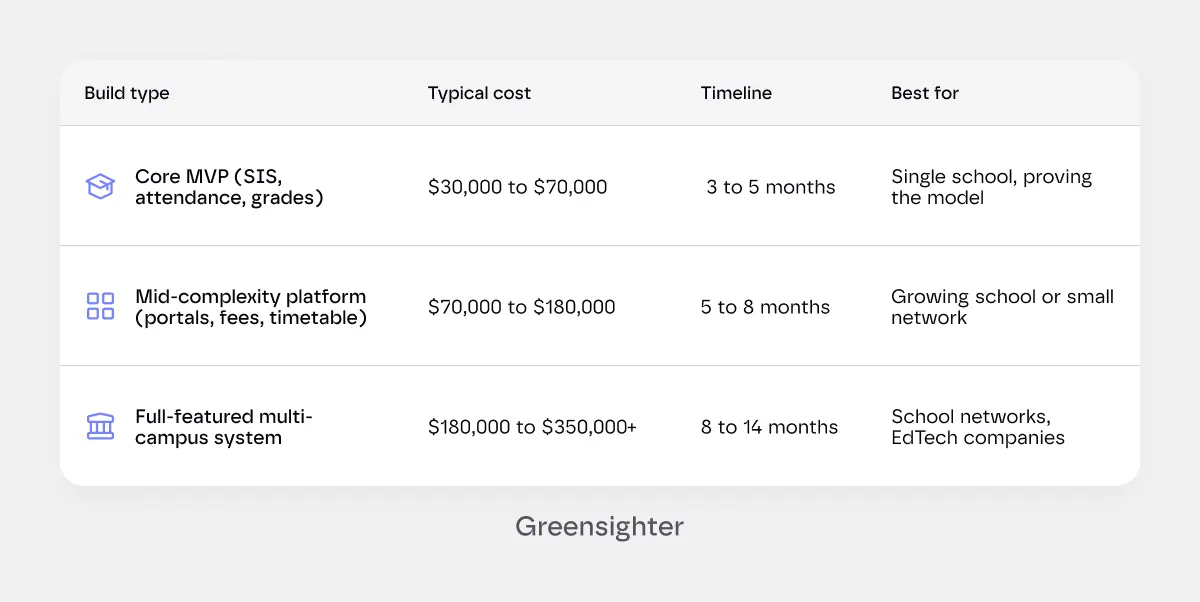
The variables that move the number most are the number of modules, integration requirements with existing systems, the complexity of your permission model, and compliance architecture for your specific jurisdiction.
Budget for post-launch costs too. Plan 15 to 20% of the initial build cost annually for security updates, compliance monitoring, feature additions as the school grows, and the mobile app maintenance that every iOS and Android update cycle requires.
Hidden costs that do not show up in initial quotes: data migration from your current system, staff training across multiple campuses, integrations with third-party tools like Google Workspace or Microsoft 365, and the first-year support burden that every new system generates while staff are learning it.
Best Practices for Implementations That Actually Stick
- Involve teachers in the design process. Not just administrators. The teachers who will use the system daily know where the friction is. They know what the current process actually looks like, not what it is supposed to look like on paper. A system designed without their input will face resistance no amount of training can overcome.
- Make the parent app genuinely good. Not functional. Good. Parents in 2026 compare every app they use to the best apps they use. If your parent portal feels clunky next to WhatsApp, they will use WhatsApp. Invest in the mobile experience for parents.
- Define success metrics before launch. What does good look like at six months? Attendance module used by 90% of teachers daily. Parent portal adoption above 70%. Fee collection time cut from three weeks to one. Without defined targets, there is no way to know if the implementation worked.
- Plan for resistance. Some staff will not want to change. The teacher who has kept their own gradebook for 20 years is not going to be immediately enthusiastic about a new system. Plan for change management as carefully as technical implementation.
- Do not turn off the old system immediately. Running old and new systems in parallel for four to eight weeks gives staff a safety net. It significantly reduces the fear that makes adoption slow. The cost of running two systems briefly is much lower than the cost of a failed rollout.
The Bottom Line
A good school management system does not make a school better at administration.
It frees the people running the school to focus on what they actually care about: teaching, student outcomes, and building an institution parents want to send their children to.
The administration is supposed to be invisible. When it is working well, nobody talks about it.
The schools that have got this right started small. One module. One problem worth solving. Proved it worked. Then expanded.
The ones that struggled tried to replace everything at once, underestimated how long training takes, and did not involve teachers early enough.
Start with the thing that is costing your staff the most hours right now. Build that first. Everything else follows from real usage.
We build school management software for independent schools, school networks, and EdTech companies. We scope the operational requirements before anything else, because the software only works if the people using it actually want to.