

You built the app in a weekend. Seriously. A few prompts, some back-and-forth with an AI, and boom. Something that would've taken months two years ago is now sitting on your laptop, ready to ship.
Then Apple rejects it.
This is the vibe coding reality in 2026. The tools have gotten shockingly good. The ideas flow faster than ever. But the App Store? It hasn't gotten easier. If anything, Apple's review process has gotten sharper and more unforgiving.
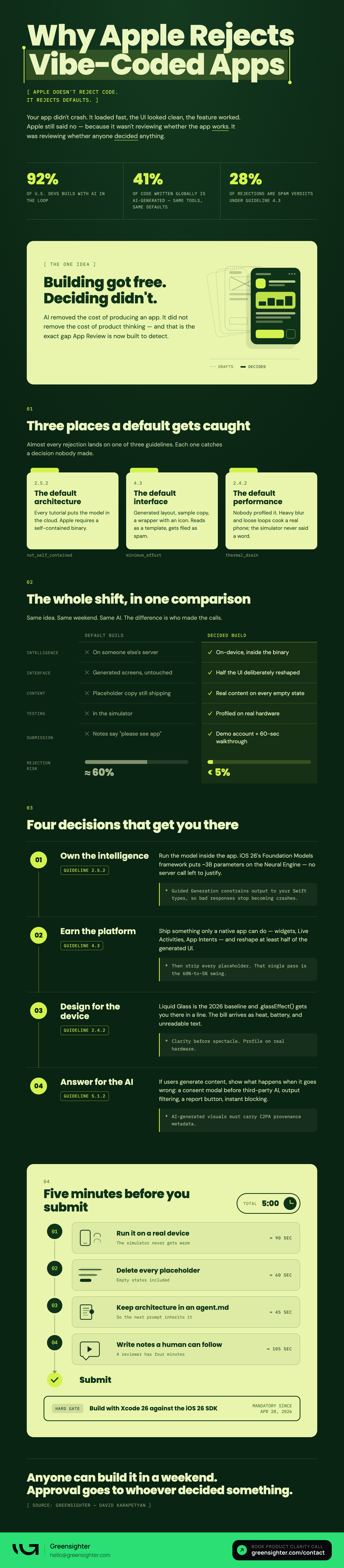
Here's the thing most tutorials won't tell you: building an AI-assisted app and getting it approved are two very different problems. Right now, 92% of U.S. developers are using AI-assisted workflows. Nearly 41% of all code being written globally is AI-generated. That's a lot of apps headed toward the same review queue, and Apple knows it.
So if you're planning to ship a vibe-coded app to the App Store this year, you need more than a good idea and a fast workflow. You need to know exactly where developers are getting rejected, why it keeps happening, and what actually works.
That's what this guide covers.
The Real Reason Vibe-Coded Apps Get Rejected
Most developers assume rejection means a bug. A crash on launch. Something is obviously broken.
That's rarely the case.
The apps getting rejected in 2026 often work fine. They load quickly. The UI looks clean. The core feature does exactly what it's supposed to do. And Apple still says no.
Why? Because Apple isn't just reviewing whether your app works. They're reviewing whether it belongs.
The App Store gets flooded with AI-assisted apps now. Apple knows this. Their reviewers are trained to spot them.
And Apple has a growing set of guidelines to deal with it. They're designed to filter out three types of submissions: low-effort apps, apps that fetch executable logic from external servers instead of running it locally, and anything that looks like a template with a fresh coat of paint.
Three guidelines are responsible for most rejections right now.
Guideline 2.5.2 says your app must be self-contained. No fetching executable logic from the cloud.
Guideline 4.3 targets spam. No clones, no minimal-effort utilities, no apps that offer nothing unique.
Guideline 2.4.2 covers performance. No overheating, no excessive battery drain.
Each one is a trap that vibe-coded apps fall into naturally. Not because vibe coding is bad. But because the default outputs of AI-assisted development tend to cut corners in exactly the places Apple checks hardest.
The good news? Every one of these is solvable. Here's how.
Keep the Intelligence On-Device
Here's the core problem with most AI-powered apps built through vibe coding.
The AI logic lives in the cloud. Your app sends a request to an external server, gets a response back, and uses that response to drive features. It feels seamless to the user. But to Apple, it's a red flag.
Guideline 2.5.2 is explicit about this. Your app must be self-contained. Everything it does needs to live inside the binary. If your app is fetching executable logic or significant features from an external LLM at runtime, it will get rejected.
The fix is to move the intelligence onto the device itself.
iOS 26 makes this possible with the Foundation Models framework. It gives you direct access to Apple's on-device language model, roughly 3 billion parameters, running entirely on Apple silicon using the Neural Engine. No external calls. No server dependency. No Guideline 2.5.2 violation.
But there's a bonus feature worth knowing about: Guided Generation.
This uses constrained decoding to force the AI to produce outputs that match your defined Swift structures. In plain terms, it means the model can't return something unpredictable or malformed. That matters because malformed AI responses are one of the most common causes of app crashes, and crashes trigger rejections under Guideline 2.1, which covers app completeness.
There's a privacy win here too. When everything runs locally, sensitive user data never leaves the device. That simplifies your compliance with privacy guidelines 5.1.1 and 5.1.2 significantly.
On-device intelligence isn't a workaround. In 2026, it's the standard.
Prove Your App Is Worth Existing
This is the one most developers don't see coming.
Your app works. It passes technical review. But Apple looks at it and decides it doesn't offer enough to justify its place in the App Store. Rejected under Guideline 4.3.
Spam rejections account for roughly 28% of all rejections right now. And "spam" doesn't just mean duplicate apps. Apple uses the label for anything that feels like a template, a website wrapper, or a minimal utility with no real value. Vibe-coded apps are especially vulnerable here.
Three things help you avoid it.
Go deeper than a WebView. Build real native functionality. Widgets, Live Activities, App Intents. These signals that your app was built for the platform, not just ported onto it.
Customize at least half of what the AI generates. If your UI looks like it came straight from a template, Apple will treat it that way. Make deliberate design decisions.
Audit every placeholder before you submit. Default text, sample images, unfinished screens. These are instant red flags. A thorough audit can bring your rejection probability from 60% down to under 5%.
Apple just wants to know that a human made real decisions about this product. Show them that, and Guideline 4.3 stops being a problem.
Not sure if your app design passes the "does this belong?" test? That's exactly what a UX audit from Greensighter catches. We've reviewed apps across SaaS, fintech, and AI products and we know what Apple's reviewers flag before you do.
Book a call and let's take a look.
Speak Apple's Design Language
In 2026, looking "native" means one thing: Liquid Glass.
Apple introduced this design language at WWDC 2025. It's the new visual standard. Translucent interfaces, dynamic blur, light refraction, fluid animations. If your app doesn't speak this language, it looks outdated before a reviewer even tests it.
The technical implementation is straightforward. SwiftUI's .glassEffect() modifier handles the aesthetic, powered by Metal 4 GPU acceleration. Most AI code generators can scaffold this for you.
But there are two traps to avoid.
The performance trap. Poorly optimized animations and excessive background processes cause overheating and battery drain. Apple rejects this under Guideline 2.4.2. Test on a real device, not just the simulator.
The readability trap. Semitransparent text over busy backgrounds looks stunning in mockups and fails accessibility review in practice. Apple's Human Interface Guidelines are clear on this. Clarity comes before spectacle.
Get both right, and your app looks like it belongs. Get either one wrong, and the design that was supposed to impress becomes the reason you're rejected.
Handle AI Content the Way Apple Demands
If your app lets users generate content with AI, Apple wants to know you've thought about what happens when it goes wrong.
Guideline 5.1.2(i) requires explicit user consent before any data is shared with third-party AI services. Not buried in a terms page. A specific modal, before it happens.
Beyond consent, three things are non-negotiable for user-generated AI content.
Filter objectionable material. You need a working system that catches problematic outputs before they reach other users.
Give users a way to report. A report mechanism isn't optional. Apple expects it, and expects you to respond to it promptly.
Block abusive users immediately. Not eventually. The ability to act fast needs to be built into the system.
There's one more requirement that catches developers off guard. Any AI-generated visual content must include C2PA metadata. This is Apple's response to the misinformation problem. It verifies the origin of generated images so users know what they're looking at.
None of this is complicated to implement. But skipping any one of these is enough to get rejected. Build it in early, not as an afterthought.
The "Vibe and Verify" Checklist Before You Submit
Moving fast is the whole point of vibe coding. But submitting too fast is how you end up in a rejection loop that costs you weeks.
Run through this before you hit submit.
Test on a real device. The simulator won't catch Neural Engine bugs or thermal issues. Real hardware will.
Remove every placeholder. Default text, sample data, unfinished screens. Go through the app as if you're a reviewer seeing it for the first time.
Set up an agent.md file. This keeps your architecture organized across AI sessions. Define your boundaries clearly: Domain, Application, and Infrastructure. Without it, AI assistants start inventing patterns that create technical debt you can't explain to a reviewer.
Write thorough App Review notes. Reviewers are humans. If your app has non-obvious AI features, explain them. A short video walkthrough and a preloaded demo account can cut your review time from weeks to hours.
Confirm your SDK compliance. As of April 28, 2026, all submissions must be built with Xcode 26 targeting the iOS 26 SDK. If you're not on it, you won't even get to review.
This checklist won't guarantee approval. But skipping any item on it is a reliable way to guarantee rejection.
The App Store Isn't the Enemy
The tools are good. The ideas are fast. The process is knowable.
On-device intelligence. Native functionality. Clean design. Proper AI handling. None of it is out of reach.
You built the app. Now do the work to ship it.
Ship smart, not just fast.
Need help getting your mobile app right before it goes anywhere near a reviewer? Greensighter designs and builds mobile apps that clear the bar from the start. We do full digital product development for startups and growing teams.
Book a call and let's talk through what you're building.