



Most patient portals are built. Not used.
Dr. Chen launched her clinic's custom patient portal eight months ago. Cost $120,000. Took six months to build. Beautifully designed.
Twelve percent of her patients have logged in more than once.
She is not an outlier.
Research shows 60% of patients rarely use a patient portal after their first login.
The American Medical Association found that 70% of non-users simply prefer to call their doctor instead.
The portal exists. Patients don't open it.
Building a patient portal that patients actually use is a different problem from building a patient portal that passes a compliance audit.
This guide covers both.
What a Patient Portal Actually Is
A patient portal is a secure web or mobile application that gives patients direct access to their health information and their care team.
No calling the front desk. No hold music.
Done well, it replaces the phone tag. Patients view lab results, request prescription refills, schedule appointments, pay bills, and message their provider. All without touching a hold queue.
Done badly, it's a login screen nobody opens and a password reset email patients forward to their junk folder.
The patient portal software market reflects this split.
Products exist across every price point and architecture. Most have the same compliance checkboxes. Very few solve the adoption problem.
Why This Market Is Moving Fast
The global patient portal market hit $6.41 billion in 2025 and is projected to reach $16.17 billion by 2030- a 20% annual growth rate.
CMS now ties Medicare physician fee schedule incentives to measurable portal engagement.
Federal agencies have committed to a unified FHIR ecosystem by 2026. That means interoperability expectations are going up, not down.
The clinics that invested in portals two years ago are already ahead. The ones waiting are falling further behind every quarter.
Essential Patient Portal Features
Not all core features are equal.
Here is how they rank across the dimensions that actually matter for your build decision.
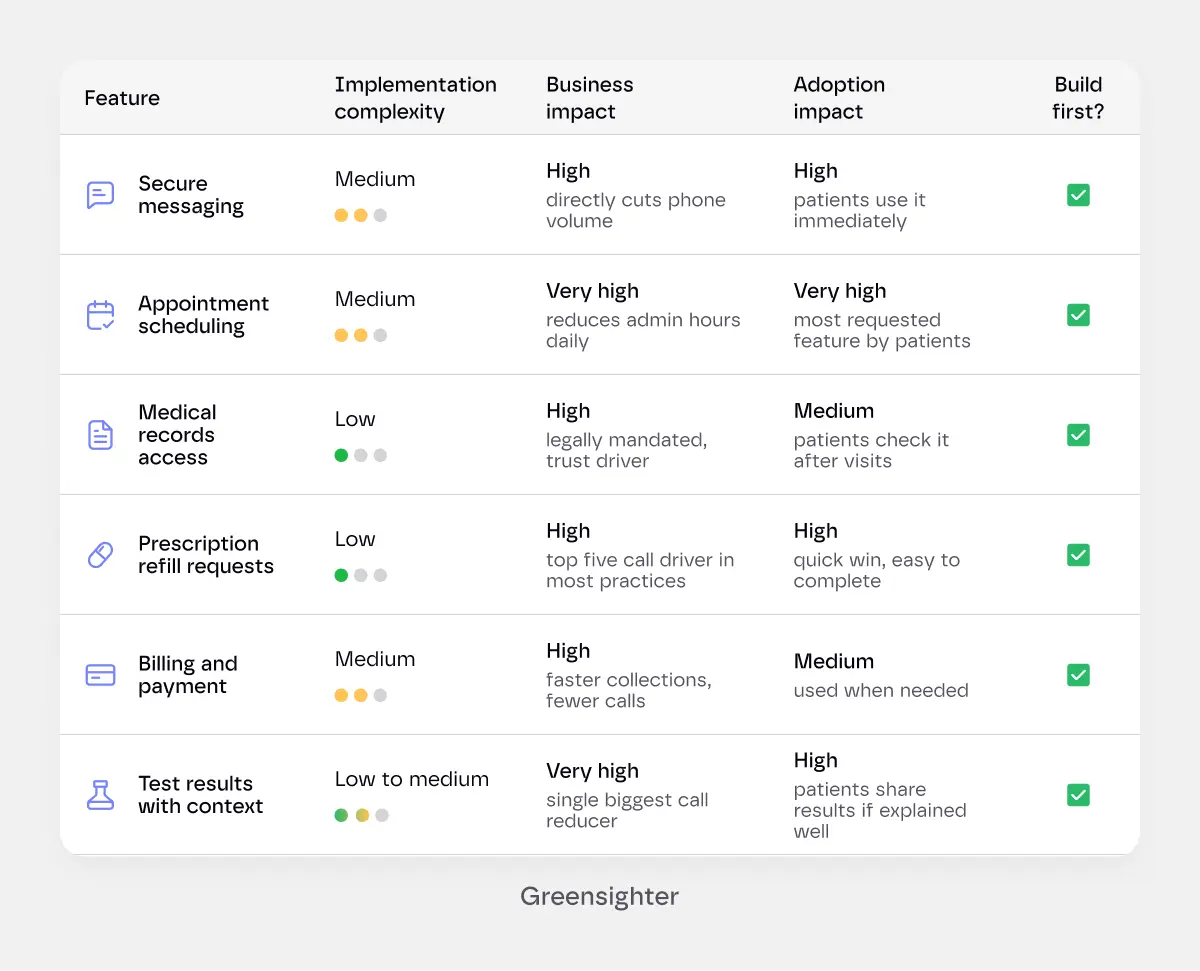
Build all six core features before touching anything advanced.
Together they address the majority of your incoming call volume and cover the adoption triggers that bring patients back.
Advanced features- for practices ready to invest
Telehealth integration. Video visits embedded in the portal, not redirected to a third-party app. The handoff between portal and video platform is where patients drop off.
AI-assisted triage. Symptom checking and message routing that helps the care team prioritise. Greensighter's guide on integrating AI into healthcare workflows covers what this architecture actually involves.
Wearable and device integration. Blood pressure monitors, glucose meters, fitness trackers. Relevant for chronic disease management. Complex to build. Only worth the investment if your patient population will actually use connected devices.
Multi-language support. JMIR research found language barriers are a primary driver of portal non-adoption. If your patient population includes non-English speakers, this isn't optional.
Caregiver access. Parents managing a child's care. Adult children managing an aging parent's records. This access model requires separate permission scoping and is worth building in from the start, not retrofitting later.
This is where most teams get into trouble. They spec every advanced feature on day one. Then the budget doubles and the timeline slips.
Build the core features for who you are now. Build the architecture to support advanced features later.
Not sure which features your patients will actually use?
Most portals overspec features and underinvest in the ones that drive engagement.
We'll help you prioritise based on your specific patient population before a line of code gets written.
Get a Feature Prioritisation Session.
The Development Process
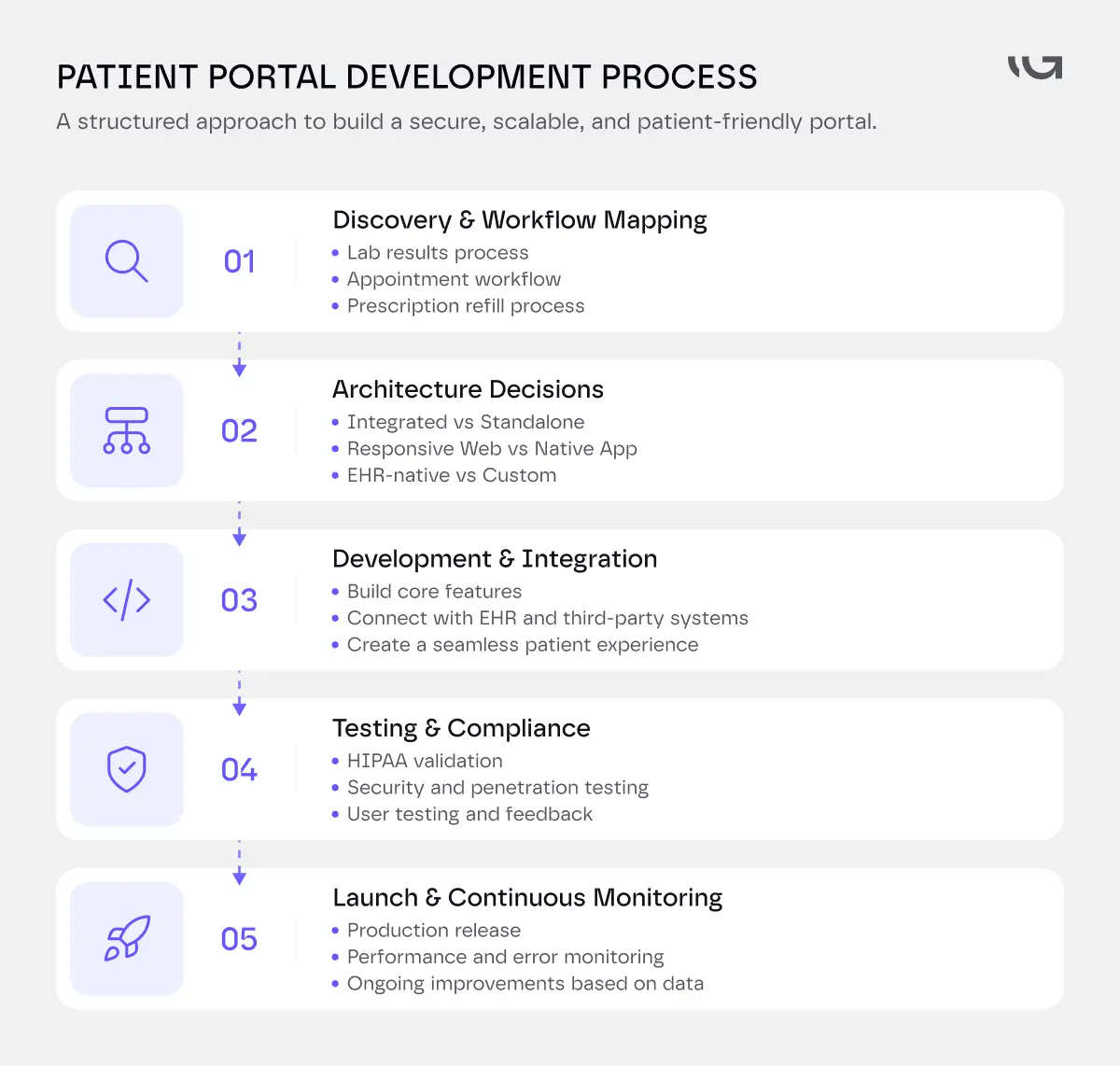
Discovery first, always
Map your existing clinical workflow before deciding what the portal needs to do.
Your appointment scheduling workflow, your lab results delivery process, your prescription refill process- these all need to be understood before they're digitised.
Digitising a broken workflow makes a faster broken workflow.
This is where we spend the first two weeks on every Greensighter portal project. Not wireframing. Mapping.
Architecture decisions that matter
Integrated vs. standalone. An integrated portal connects directly to your EHR via FHIR APIs. Patient data flows in real time. Changes in one system reflect in the other. A standalone portal has its own database and syncs on a schedule. Integration is harder to build. It's also the only version patients actually trust- because the data is current.
Web vs. native mobile app. A well-built responsive web portal covers 90% of mobile use cases. A native iOS/Android app costs significantly more and requires separate maintenance. Build responsive web first. Add native mobile when you have usage data that justifies it.
Greensighter's own breakdown of healthcare mobile app development cost covers this decision in the context of regulated healthcare products.
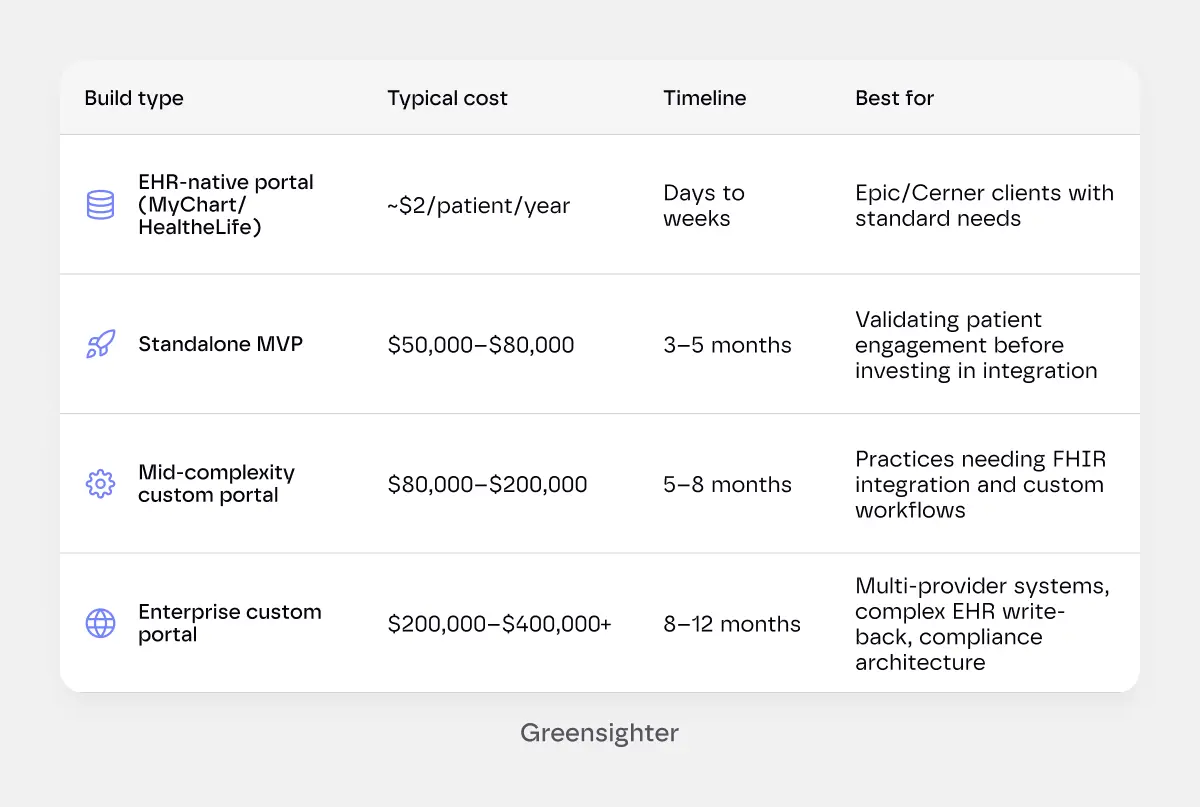
EHR-native vs. custom. Epic's MyChart and Cerner's HealtheLife cost around $2 per patient per year. They're cheap, they're compliant, and they look like every other hospital portal. If you're on Epic or Cerner and your needs are standard, the native portal is probably the right call. If your workflows are non-standard, your brand matters, or you need features the EHR vendor's roadmap won't deliver, custom is the path.
The build timeline
A basic portal with core features runs 3–5 months.
Mid-complexity builds with EHR integration and a patient-facing mobile experience run 5–8 months.
Enterprise builds with deep EHR write-back, multi-provider support, and compliance architecture can run 8–12 months.
What actually extends projects
Most delays are not technical.
They are predictable.
Here is what actually causes them.
EHR vendor API surprises. The documentation says the integration is straightforward. The actual implementation disagrees. Missing fields, undocumented edge cases, authentication quirks nobody warned you about. Add two to six weeks to any EHR integration timeline, just as a baseline.
Dirty data. You know that patient database you have been adding to for fifteen years? It probably has duplicates, missing identifiers, and three different date formats depending on who entered the record. Nobody realises how bad it is until they try to move it. Data cleaning alone can quietly add a month to a project.
Too many people in the room. Three approval layers and no single decision-maker is a recipe for delays that have nothing to do with the build. Every rescheduled review meeting is calendar time the developers cannot get back.
The mid-build feature request. A new feature added in week six of an eight-week build does not add two weeks. It adds six. Because it touches decisions that were already made. Lock the scope. Change it through a process, not a Slack message at 4 pm on a Friday.
Compliance reviews move at their own pace. A legal review of vendor contracts or a security audit does not speed up because the build is ready. It has its own timeline. Build that into the plan from day one, not as an afterthought.
Third parties do not care about your launch date. A payment processor can take three weeks to approve a healthcare BAA. A lab system might require their own vendor team to enable API access. Find every external dependency in week one. They will not find themselves.
HIPAA Compliance: What It Actually Requires
A HIPAA-compliant patient portal isn't a feature. It's a foundation.
Encryption at rest and in transit. Every piece of PHI stored or transmitted needs to be encrypted. TLS 1.3 for data in transit. AES-256 for data at rest. These aren't optional extras; they're table stakes.
Role-based access control. A patient should see their records. A caregiver should see what they've been granted access to. A front-desk admin should see what their role requires. Nobody sees more than they need to.
Audit logging. Every access to a patient record, every message sent, every file downloaded- logged with a timestamp, user ID, and action taken. This isn't about surveillance. It's about being able to answer a regulator's question with a complete record.
Business Associate Agreements. Every third-party vendor that touches PHI- your hosting provider, your payment processor, your analytics platform- needs a signed BAA. If a vendor won't sign one, they can't be part of your stack.
Annual penetration testing. The 2025 HIPAA updates introduced requirements for annual pen testing and biannual vulnerability scans. Not a one-time check at launch. An ongoing programme.
Build compliance in from sprint one. Retrofitting it after launch costs roughly twice as much and delivers weaker protection.
Integrations That Define Whether the Portal Works
EHR integration
This is the make-or-break integration.
A portal that doesn't talk to your EHR in real time shows patients stale data. Stale data destroys trust faster than any UX problem.
FHIR R4 is the current standard. CMS mandates it. Any integration built on CSV exports or batch sync is already behind.
The harder question is read vs. write.
Read access is relatively straightforward: the patient views their records. Write-back, patient-submitted data flowing back into the EHR, is significantly more complex.
It's also significantly more valuable for chronic disease management and care coordination.
Scheduling systems
If appointment booking lives in a separate system from the EHR, the portal needs to connect to both.
Real-time slot availability, booking confirmation, and cancellation handling all need to sync without manual intervention.
Greensighter's piece on clinic scheduling mistakes that cost practices patients covers exactly what a broken handoff costs in a live clinical setting.
Billing and payments
Stripe, PayPal, and Braintree are the common payment processors. Each needs a signed BAA — not all payment processors offer them. Verify before you integrate.
Lab and diagnostic systems
Lab results need to arrive in the portal before a patient calls asking where they are.
That means a direct integration with your lab system, not a manual upload process.
Patient Portal Development Cost
Patient portal cost varies more than most clients expect before they start pricing it out.
Here's what realistic builds cost in 2026:
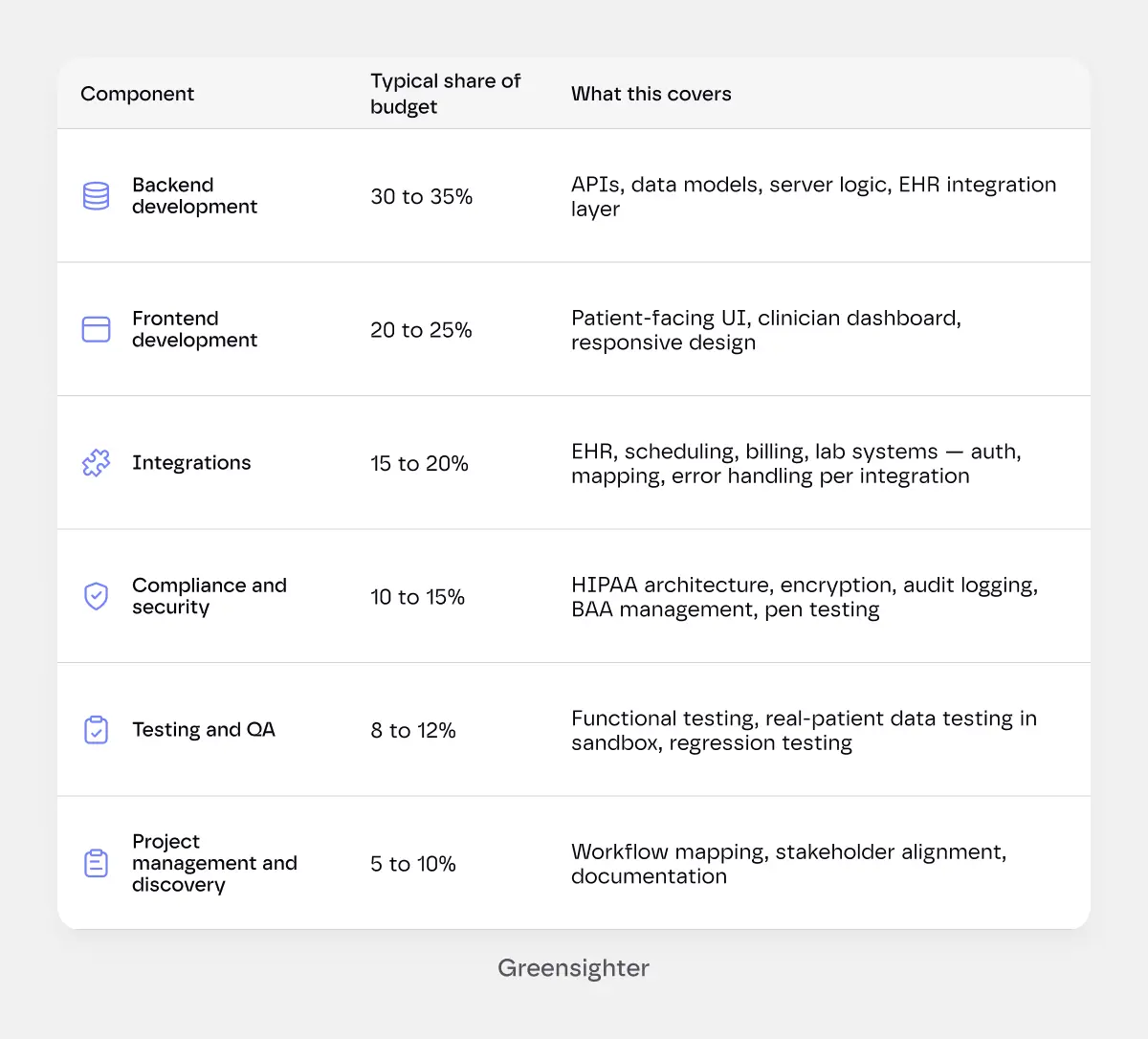
What drives the number most:
Here is how the budget typically breaks down across a mid-complexity custom portal build of $80,000 to $200,000.
Proportions shift at different price points, but the categories stay the same.
Common Patient Portal Development Mistakes
Most of these happen before a line of code is written. That is also when they are cheapest to fix.
- Designing for the demo, not for the patient. The portal that looks best in a stakeholder presentation and the portal that a 68-year-old with two chronic conditions uses reliably are often different products. Test with your actual patient demographic before you launch, not after you notice the adoption numbers.
- Treating compliance as a launch checklist. HIPAA is an architecture decision, not a final review. Teams that bolt compliance on at the end spend significantly more money and end up with a weaker system. Build it in from sprint one.
- Launching without an enrolment strategy. A portal nobody knows about is a portal nobody uses. Enrolment happens at the point of care, when a staff member registers the patient in the waiting room. An email sent after the visit generates a fraction of the uptake. Plan the enrolment workflow before you plan the features.
- Buying a generic portal for a non-generic workflow. An off-the-shelf portal that does not match how your practice actually operates trains patients that the portal does not work. They call instead. The right decision between custom and off-the-shelf is worth making carefully. The wrong one costs more to correct than the decision itself.
- Skipping post-launch monitoring. FHIR APIs change. EHR vendors deprecate fields. Payment processors update their authentication. A portal with no active monitoring will break silently, and you will find out when patients call to say their lab results are missing.
- Underestimating the content work. The test result that arrives with no context generates a call. The medication list that uses clinical abbreviations generates a call. The appointment confirmation that does not say what to bring generates a call. Content decisions are made during development. Making them badly costs you in call volume and patient trust.
Budget for post-launch too. Plan 15–20% of your initial build cost annually for security updates, compliance monitoring, FHIR API changes, and the ongoing prompt tuning if you've added any AI features.
Best Practices: How to Build a Portal Patients Actually Use
Most clinics launch a portal and then wonder why nobody logs in. The problem almost always starts before development.
Design for the phone call you want to eliminate. List your top ten incoming call types. Build the portal features that remove those call types from your queue. Start there, not with a feature wishlist.
Mobile-first, not mobile-friendly. Practices with mobile-optimised portals see 40–60% higher adoption than those with desktop-only interfaces. Your patients are on their phones. The portal needs to work there first.
Enrol patients at the point of care. The highest-leverage moment for portal registration is the waiting room, not an email sent three days after a visit. Staff who enrol patients during check-in drive adoption. Staff who hand out a paper with a URL don't.
Send results with context. A patient who gets a lab result they can't interpret will call. A patient who gets a result with a plain-language explanation and a next-step message won't. This is a content decision, not a development decision. Make it before launch.
Test with real patients before launch. Not internal staff. Not stakeholders. Actual patients, ideally ones who represent your least tech-savvy demographic. If a 72-year-old patient with no prior portal experience can complete the onboarding flow in one sitting, you're ready to launch.
Build a kill switch for every integration. If your lab system goes down, the portal should degrade gracefully, not show patients error messages at 9 pm. Each integration needs its own fallback behaviour.
The Build vs. Buy Decision
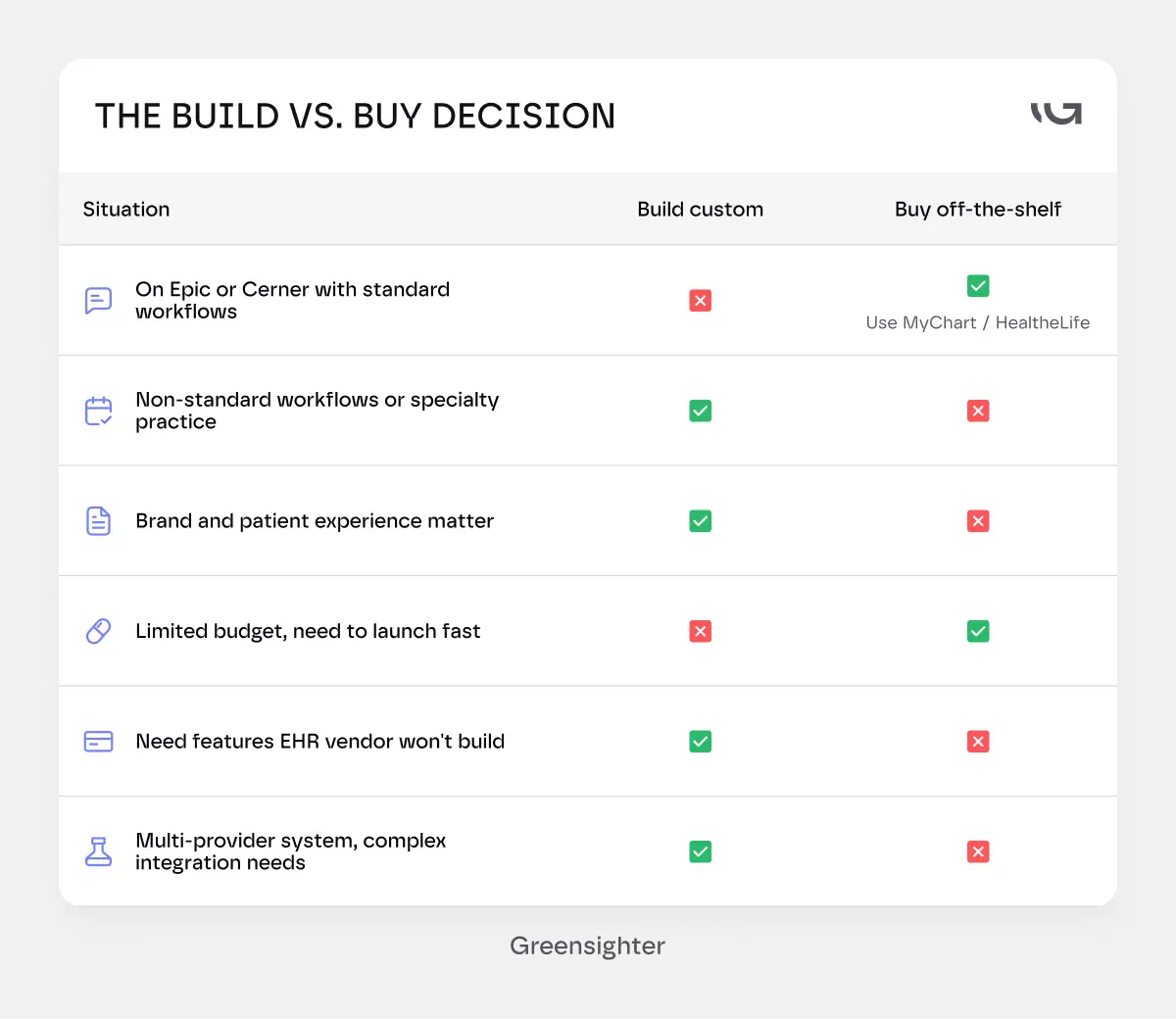
If you're on Epic and your needs are standard, MyChart is probably the right answer. It's cheap, it's compliant, and you can launch in weeks.
If your workflows don't map to what the EHR vendor's portal supports, custom is the better long-term investment.
Same if the portal is a core part of your patient experience, not just a compliance checkbox.
The ROI Case for Clinic Owners and Healthcare Executives
A patient portal is a cost centre in year one.
In year two and beyond, it is a revenue and efficiency driver.
How?
- Phone call reduction.
The American Academy of Family Physicians found that primary care practices handle as many as 20 patient calls per provider each day. A significant share of those are for tasks a portal handles automatically: appointment scheduling, prescription refill requests, lab result questions, billing queries.
Each call handled by a staff member carries a real cost in time and overhead. Each one a patient completes themselves through a portal does not.
- No-show reduction.
MGMA data shows no-shows and last-minute cancellations can consume roughly 14% of a medical group's revenue on a given day, with losses reaching approximately $150,000 annually per physician in some practice models.
AAFP's own data puts the average medical practice no-show rate at 5 to 7%. Automated appointment reminders, one-click confirmation, and easy online rescheduling directly reduce that number. Fewer empty slots means more recovered revenue on the same schedule.
- Faster collections.
Patients pay bills faster when they can do it from their phone in two minutes. Practices that add online payment to their portal consistently report shorter collection cycles and lower outstanding balances.
The exact improvement varies by practice size, payer mix, and how well the billing module is designed.
- Administrative time savings.
Every call a patient handles in the portal is a call a staff member did not have to take. At the scale of a 10-provider practice, that adds up to meaningful recovered staff capacity every single day.
- Patient retention.
A patient who can message their care team, view their results, and book a follow-up without calling is a patient who stays. Replacing lost patients is significantly more expensive than keeping existing ones.
A well-adopted portal reduces the friction that causes patients to quietly move to another practice.
The Bottom Line
A patient portal that sits unused isn't a technology failure. It's a design and adoption failure.
The portals that work are built around the specific phone calls the practice wants to stop receiving.
Not a feature list copied from a competitor's marketing page.
Start with core features. Build for your actual patient population.
Integrate with your real EHR. And plan for how you'll get patients to actually open it before you write a single line of code.
We've built patient portals for clinics and digital health companies across primary care, specialty practice, and healthcare AI.
We scope the adoption problem alongside the build, because a portal nobody uses isn't worth building.
Tell Us What You're Building. We'll scope the project honestly, including integrations, compliance requirements, and the adoption strategy, before we provide a quote. Get a Straight Answer on Your Portal Project.


.webp)
.webp)