



Dr. William manages 340 heart failure patients.
Every Monday, her care coordinator calls through the list. One patient at a time. Manually.
Last spring, one patient gained four pounds of fluid over a weekend. Nobody caught it. He was readmitted on Tuesday. Four days in hospital. Completely preventable.
That is the problem remote patient monitoring software exists to solve.
Not fitness trackers. Not wellness apps. Clinical software that tells a care team when a specific patient is trending in the wrong direction, before it becomes a crisis.
Here is what building remote patient monitoring software actually involves.
What Remote Patient Monitoring Software Actually Does
RPM software connects medical devices in a patient's home to a clinical care team.
A patient takes their blood pressure every morning. The reading goes from their device to your platform to a care coordinator's dashboard. If it crosses a defined threshold, an alert fires. Someone calls.
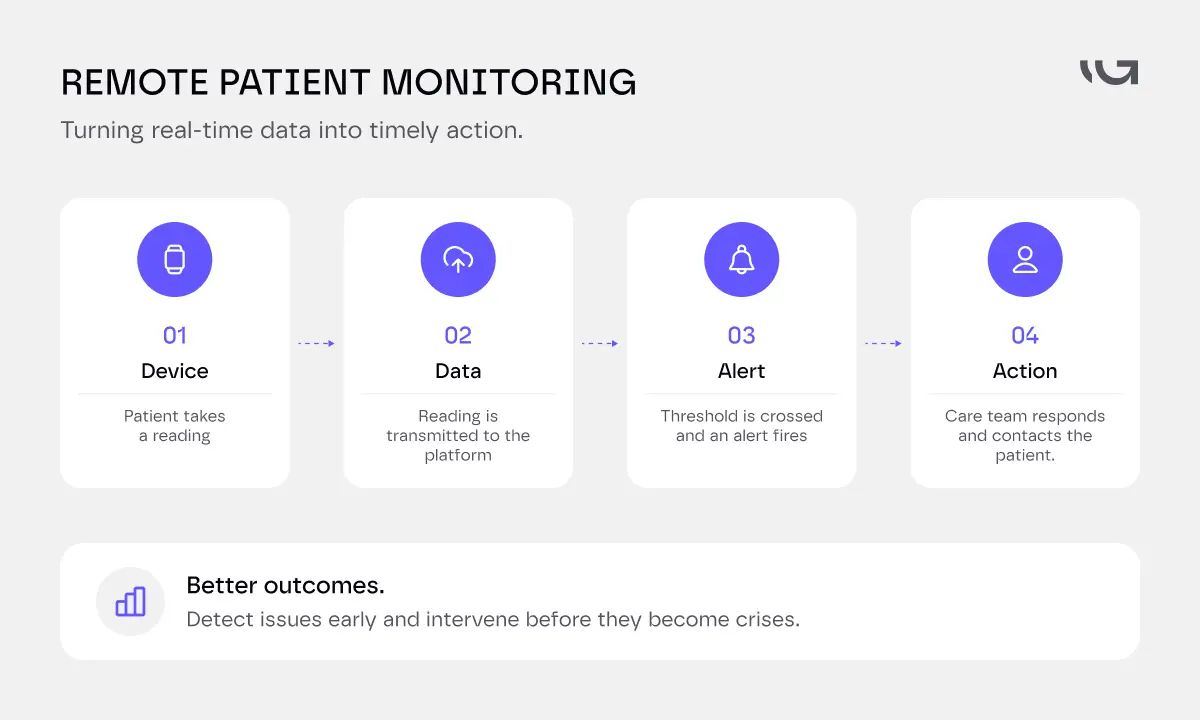
That is the core loop. Everything else supports it.
The market reflects how much this is needed. The RPM market is projected to grow from $36.29 billion in 2026 to $66.33 billion by 2031, at 12.8% annually. The software segment is growing fastest.
The driver is simple. Three in four American adults have at least one chronic condition. Those patients need monitoring between appointments, not just during them.
Core Features of RPM Software
Most teams overspec features on day one when building RPM software. Start with what directly serves the clinical loop. Add everything else when patient data justifies it.
Here is how the feature set breaks down across three layers.
- Patient-facing features are what patients see and interact with every day. A mobile app for device pairing and symptom logging.
Simple onboarding, because if a 70-year-old cannot connect their blood pressure cuff in ten minutes, your adoption rate will show it.
Push reminders that feel human, not clinical. Patients who understand why they are being monitored actually use the device.
- Clinician-facing features are where the workflow value lives. A dashboard that shows who needs attention first, not a raw feed of every reading.
Configurable alert thresholds per patient and per condition. Trend views over days and weeks. Audit-ready documentation for every action taken.
- Platform features hold everything together. Real-time data ingestion from multiple device types. EHR integration so readings land in the clinical record without manual entry.
Automated time tracking for CMS billing. Role-based access so a coordinator and a physician see different views.
- Advanced features worth considering once you have scale. Predictive alerting that flags patients trending toward a threshold before they cross it. Readmission risk scoring. Telehealth integration so a team can move from dashboard to video call without switching apps.
.webp)
Core Features of RPM Software
What to build first, and why
Not all four layers matter equally on day one.
Below is the order that works.
- Clinician-facing features come first. Not patient-facing. A dashboard that triages who needs attention. Alert thresholds that actually fire. Without this, you have devices sending data into a void. Nobody's watching, so nothing gets caught.
- Platform features come next. Real-time ingestion and role-based access are not optional extras. They're what makes the clinician dashboard trustworthy.
- Patient-facing features come third. Keep the app simple at launch. Device pairing and basic logging. Nothing fancier.
- Advanced features come last, and only once you have real usage data. Predictive alerting and readmission scoring need a baseline of readings to work from.
The mistake most teams make: they build the patient app first because it's the visible part. Then discover the care team has no workflow to act on the data coming in.
Build the first two layers well. The third follows from real usage data.
Medical Device Integrations
This is where most RPM projects break. The software is manageable. Getting devices to talk to it reliably is not.
Bluetooth vs. cellular is the first decision. Bluetooth devices are cheaper. They also require the patient's phone to be nearby and paired. When that fails, it fails silently. Missing data shows up days later. Cellular devices send readings directly to your platform.
No phone needed. More reliable. Higher cost per device. For elderly or low-income patients, cellular is almost always the right choice.
Device SDKs and APIs connect the hardware to your platform. Withings, iHealth, Omron, Dexcom, and Abbott all expose APIs. Some are stable and well-documented. Some change without notice. Some require a partnership agreement before you can access them.
Check the integration status of your target devices before you scope the build. Not after.
FHIR and HL7 for EHR write-back is where device data meets the clinical record. A reading that lives only in your RPM platform is a silo. Getting it into the EHR alongside clinical notes and medication history requires FHIR R4 integration.
For older EHR systems, you will need an HL7 v2 middleware layer. Greensighter's guide to integrating data systems into healthcare workflows covers this architecture in detail.
Alert routing is the piece most teams underestimate. An alert going to everyone creates noise. An alert going to nobody creates liability. Who gets notified, within what timeframe, and what happens if nobody responds- these are clinical workflow decisions.
Get your care team in the room before you build this logic. Not during QA.
HIPAA Compliance for RPM Software
RPM software handles some of the most sensitive data in clinical practice. Continuous biometrics. Real-time readings. Direct patient messaging. Compliance is not a feature you add. It is the foundation you build on.
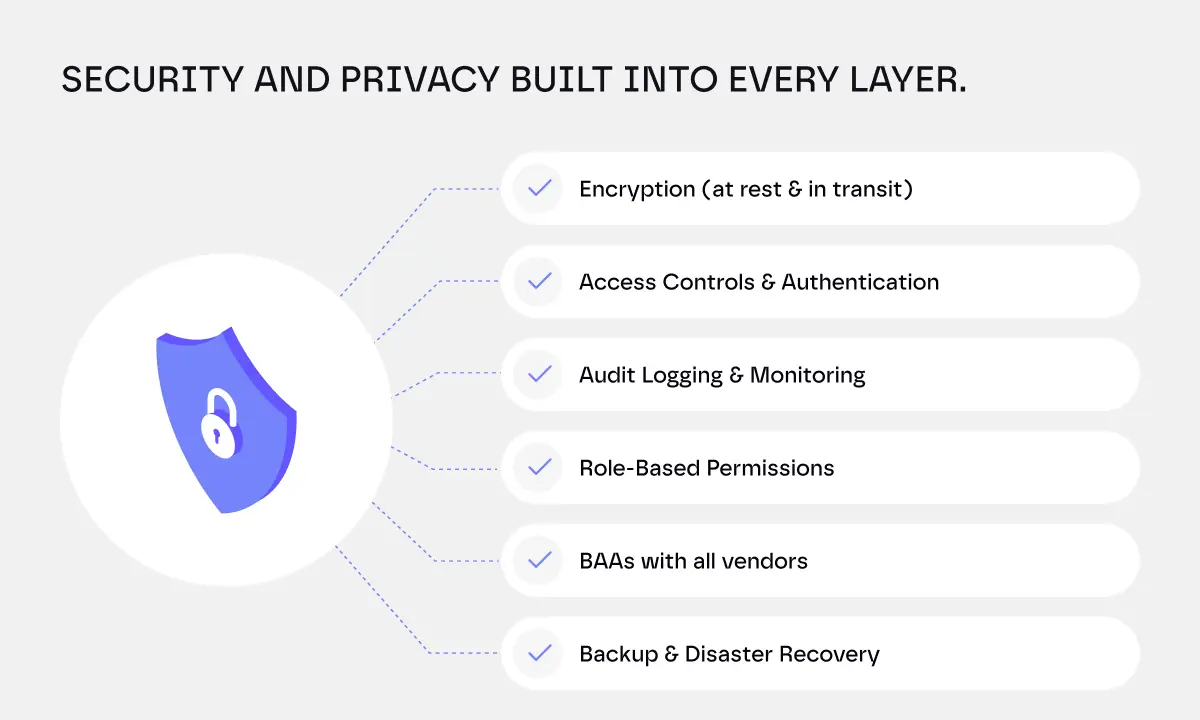
Here is what it actually requires.
Encryption everywhere. Every reading, every alert, every message. TLS 1.3 for data in transit. AES-256 for data at rest. This applies to device-level transmission too, not just your databases.
BAAs with every vendor that touches patient data. Your cloud host, your push notification service, your analytics platform. If it sees a patient reading, it needs a signed Business Associate Agreement.
Audit logging. Every data access, every alert acknowledged, every clinical action. RPM audit trails matter more than most because the same data often lives in two systems: your platform and the EHR. Reconciling those records during a review is far easier when both sides have clean logs.
Role-based access. Patients see their own data. Coordinators see their assigned panels. Physicians see what their role requires. No cross-patient access outside authorised clinical relationships.
Annual penetration testing. The 2025 HIPAA updates made this mandatory, along with biannual vulnerability scans. This is not a one-time check at launch. It is an ongoing programme.
Build compliance in from sprint one. Greensighter's breakdown of healthcare software development costs covers what compliance architecture adds to a budget across different build types.
The Development Process
Discovery before everything else. What conditions are you monitoring? Which devices will patients use? What does a care coordinator's actual day look like with this software running? Who acts on an alert, and within what timeframe? Answer these before you open a design tool.
Device selection happens in parallel with discovery. The devices your patients use shape your entire data architecture. Cellular vs. Bluetooth. FDA-cleared vs. consumer-grade. Confirm which devices you are building for, verify API access requirements, and document certification status before development starts.
Architecture and EHR integration design comes next. How does device data flow into the platform? How does it flow from the platform into the EHR? What does your alert routing logic look like? These decisions are expensive to reverse mid-build.
Start with one condition pathway. Cardiac monitoring and diabetes are the most common starting points. They have the clearest clinical protocols and the most mature device ecosystems. Prove the core loop works before adding conditions.
Test with real patients before launch.
Not internal staff.
Not stakeholders.
Actual patients, using the devices they will actually use, in their actual homes. Not a clinic with reliable WiFi. A living room with a 73-year-old and a Bluetooth cuff.
Remote Patient Monitoring Software Development Cost
The range is wide. Here is what real builds cost in 2026.
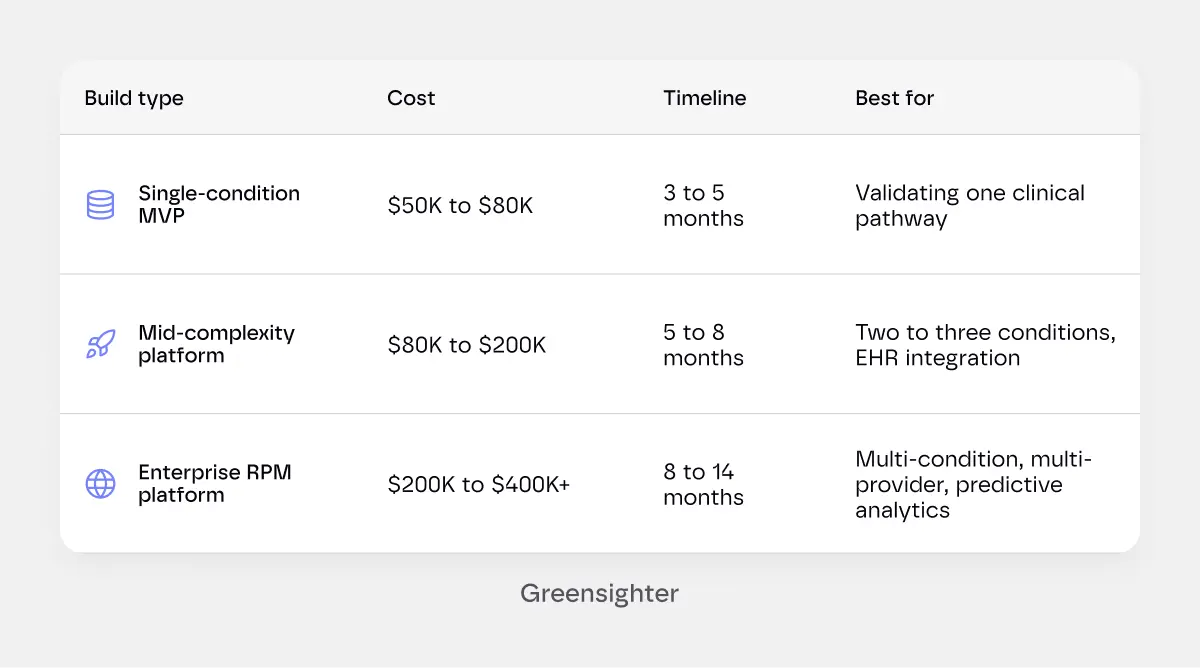
The gap between a $50K build and a $300K build is not padding. It reflects real differences in device coverage, integration depth, and compliance architecture.
Budget 15 to 20% of the initial build cost annually after launch.
Security updates, device SDK changes, EHR integration maintenance, and compliance monitoring are ongoing costs, not optional ones.
- Device integrations drive a lot of this. Device makers update their SDKs and APIs without much warning. Your platform breaks. Someone has to fix it, fast, because a broken integration means missing patient readings.
- Compliance drives more of it. Annual penetration testing is now mandatory under the 2025 HIPAA updates. Vulnerability scans run twice a year. These aren't one-time costs. They're a standing line item.
- EHR integration maintenance adds its own weight. EHR vendors push updates too. FHIR and HL7 mappings need to be checked and adjusted whenever they do, or data stops landing where it should.
- General maintenance covers everything else. Bug fixes, performance tuning, and the small changes clinical teams ask for once they're actually using the software daily.
Budget for all four separately. Treating "maintenance" as one line item is how teams get surprised by the real number.
CMS Reimbursement: Why RPM Has Different Economics
Most health software costs money to run. Remote patient monitoring software can pay for itself through CMS billing. This matters for the build vs. buy decision more than most articles acknowledge.
CMS reimburses RPM services through a set of billing codes.
The core ones are as follows.
- 99453 covers device setup and patient education. Billed once per care episode.
- 99454 covers device supply and data transmission. Requires 16 days of readings in a 30-day period. Your software must track and document this threshold per patient automatically.
- 99457 covers the first 20 minutes of care management per month.
- 99458 covers each additional 20 minutes.
- Two new codes added in 2026: 99445 covers shorter monitoring windows of 2 to 15 days. 99470 covers 10-minute management increments.
At full capture, a practice can generate $150 to $200 per enrolled patient per month. At 200 enrolled patients, that is $30,000 to $40,000 in monthly RPM revenue.
A custom platform costing $150,000 to build can pay for itself in under a year at that scale, if the billing compliance features are built correctly from day one.
Your software needs to track the 16-day transmission threshold per patient, document care management time accurately, and generate audit-ready billing reports. These are not features you can retrofit without rearchitecting your data model.
Build vs Buy RPM Platform
This decision comes up early, and it's worth answering properly before you scope anything.
Off-the-shelf RPM platforms exist. Vivify Health, Health Recovery Solutions, and a handful of others offer pre-built software with device integrations already done. You get to market fast. Compliance is handled. Setup takes weeks, not months.
The tradeoff: you're renting someone else's roadmap. Per-patient pricing scales with your volume. Customizing alert logic or adding a device they don't support usually isn't possible. Your workflow bends to fit their software, not the other way around.
Buy makes sense for a single-condition pilot. A clinic testing whether RPM works for their patient population, at low volume, without a custom EHR to integrate with. Prove the model first. Build later if it works.
Build makes sense in a few specific cases. You're running multiple conditions with different device and alert requirements. You need deep, specific EHR integration an off-the-shelf platform won't support. You're at a patient volume where per-patient SaaS pricing costs more, over a few years, than a custom build would.
Or you're a digital health company building RPM as your actual product, not a feature bolted onto a clinic's workflow.
The CMS billing math changes this calculation too. At real scale, 200+ enrolled patients, the monthly reimbursement can justify a custom build within a year, if the billing compliance features are built right from day one.
That math rarely works out the same way for a small pilot.
Start with buy if you're validating the model. Move to build once volume and requirements outgrow what an off-the-shelf platform can flex to support.
Common RPM Implementation Challenges
Most RPM projects run into the same handful of problems. Knowing them upfront saves you from learning them the hard way.
- Patients stop using the devices. Batteries die, connectivity drops, patients forget. Without automated outreach and a replacement protocol, compliance quietly falls until a billing cycle comes up short.
- Alert fatigue burns out care teams. Every reading generates an alert, and coordinators start ignoring them. The fix is better triage, not more alerts; coordinators handle routine escalations, and physicians only see real clinical calls.
- Device data doesn't reach the EHR cleanly. A reading stuck only in your RPM platform is a silo. Without solid FHIR or HL7 integration, clinicians check two systems, then stop checking one.
- Billing compliance gets bolted on too late. The 16-day transmission threshold and care management time need automatic, per-patient tracking from day one. Retrofitting it later usually means rearchitecting your data model.
- Device APIs change without warning. A vendor updates their SDK, your integration breaks silently, and nobody notices until a coordinator asks why a dashboard has gone quiet.
- Elderly patients get left out of the design process. Software tested on office WiFi looks nothing like software tested by a 73-year-old with a Bluetooth cuff at home. Skip real-patient testing, and adoption problems show up after launch.
Every one of these is solvable. None of them are solved by better code alone. They need device logistics, alert protocols, and clinical workflow designed alongside the software, not after it ships.
Best Practices: Deployments That Actually Work
Most RPM implementations fail because the software works and the patients stop using the devices.
These practices separate deployments running at 70% patient compliance from ones stuck at 20%.
- Ship devices to patients. Do not make them pick one up. A patient who receives a pre-paired device in the mail with a one-page setup card is far more likely to use it.
- Design alerts for coordinators, not physicians. A well-designed triage layer where coordinators handle routine escalations reduces alert fatigue and gets faster response times. Physicians see only what requires clinical judgment.
- Track device compliance daily. Missing readings discovered after two weeks are a billing compliance problem and a clinical record gap. Your platform should surface daily compliance rates per patient, not weekly aggregates.
- Plan for device failure before you launch. Batteries die. Connectivity drops. Patients reset devices by accident. Your platform needs a protocol for when a patient goes silent: automated outreach, escalation to a coordinator, device replacement workflow.
- Connect RPM to your scheduling workflow. The value compounds when an alert can trigger a follow-up appointment or a medication adjustment without the care team manually coordinating across three systems.
Greensighter's piece on how scheduling gaps cost clinics patients shows exactly what a broken handoff costs in a live clinical setting.
Most RPM implementations have strong software and weak operations. The device logistics, patient onboarding, and alert protocols need to be designed alongside the software. Not as an afterthought.
Tell us what you are monitoring and who your patients are.
Every condition has different device requirements, different alert thresholds, and a different care coordinator workflow.
Start Your RPM Scoping Call.
The Bottom Line
RPM software development is not complicated to describe. It is complicated to build well.
Device connectivity, EHR integration, alert routing, HIPAA compliance, CMS billing automation: each one has its own failure mode. And unlike most software failures, an RPM failure has a patient on the other end of it.
The builds that work are not the most feature-rich ones. They are the ones that got the core clinical loop right before they added anything else.
Start with one condition. Prove the loop works. Scale from there.
We have built remote patient monitoring software for clinics and digital health companies across cardiology, diabetes management, and post-acute care. We scope the clinical workflow first, because the software only matters if the care team actually uses it.
Tell Us What You Are Building.


.webp)
.webp)