



Most clinics treat no-shows as a patient responsibility problem. The real problem is that your scheduling system has zero predictive power.
A patient books an appointment three weeks out. You send a confirmation email and a text reminder. The automated text went out, the patient clicked 'Confirm,' and then they ghosted you anyway.
They did not make any call to cancel, and there may not be a legitimate emergency.
They simply forgot, double-booked themselves, or decided the trip wasn't worth their time.
Your front desk marked them as a no-show. Your hygienist had dead time. Your provider twiddled their thumbs. And your revenue walked out the door, except it never showed up in the first place.
Have you thought about why?
What your scheduling system actually knows: a patient name and a time slot.
That's it.
It doesn't know that this particular patient booked 6 months in advance, faces a no-show rate of 38.3%, nearly quadruple the 9.1% rate for appointments made within two weeks, and has a history of missing appointments. It doesn't know they are more likely to keep morning slots with Provider A than Provider B.
A Northern California primary care group using Simbo AI reduced no-shows by 19% and cut same-day cancellations by 12.3%. They made $6.2 million in additional revenue in the first year, a 3,000% return using double booking along with AI.

Why scheduling broke in the first place
The old model assumes patients will show up. Industry data says the average patient no-show rate in outpatient settings reaches up to 50%.
Your current system handles this with reminders. A day-before email or text. Good. Better than nothing.
What your scheduler is not doing:
- To identify which patients are likely to no-show before they book
- Suggesting optimal appointment times for each individual
- Automatically rebooking cancelled slots with patients on the waitlist
- Learn why certain time slots get abandoned more than others
Clearly, this isn't a people problem, it’s a data problem. And your spreadsheet doesn't have the processing power to solve it.
But before you invest in healthcare software development, you need to understand the real costs, ROI, and whether HIPAA-compliant AI scheduling actually makes financial sense for your practice.
How to calculate your no-show problem
Before evaluating any medical scheduling software, measure your baseline. Here are the two formulas you need:
No-Show Rate: (Number of no-shows / Total scheduled appointments) × 100 = %
Annual Revenue Loss: (Total annual appointments × No-show rate) × Average revenue per visit = $
For example, if you see 50 patients/day × 240 working days = 12,000 annual appointments. At 25% no-show rate and $150 per visit: (12,000 × 0.25) × $150 = $450,000 in annual losses. That's real money. Calculate yours.
What AI scheduling actually does
AI-powered medical scheduling software uses machine learning to predict behavior. It looks at historical data, such as which patients cancelled, which showed up, what times they preferred, how far away they live, and what their appointment type was.
Then it builds a prediction model. When a new patient books, the system estimates their no-show probability. If it's high, the system can offer them a different time slot that they are more likely to keep.
Send more aggressive reminders (text instead of email).
Suggest shorter appointment windows (easier to commit to).
Or pair them with a specific provider they've had success with.
Also, it doesn't read patient minds, cure commitment issues, and change human nature. Some patients will no-show no matter what, so the goal isn't 100% elimination.
Total Health Care used AI scheduling to identify patients with an 80% no-show risk and targeted them with proactive outreach. For this high-risk segment, completion rates jumped from 11% to 36%, which is a 25-point improvement that recovered significant revenue from appointments that would have otherwise been lost.
Cost of an AI scheduling software
As per typical industry ranges based on vendor analysis pricing varies wildly, but here's what you're looking at:
Per-Provider Models
Most vendors charge per provider per month.
- Entry-level: $50-100/provider/month (basic scheduling + AI reminders)
- Mid-market: $150-300/provider/month (advanced predictive analytics, integration hooks)
- Enterprise: $400+/provider/month (custom models, dedicated support, white-label options)
For a 12-provider practice, basic service costs $600-1,200/month, or $7,200-14,400 annually.
Seat-Based Models
Some vendors charge per user accessing the system (different from providers).
- Typical range: $100-500/user/month
- Average practice needs: 5-8 concurrent users (schedulers, admins, providers)
- Annual cost for 8 users: $9,600-48,000
Implementation & Setup Fees
Don't forget these hidden costs:
- Data migration: $2,000-8,000 (cleaning historical data, importing records)
- Integration with existing EHR: $3,000-15,000 (connecting to Epic, Cerner, etc.)
- Staff training: $1,000-5,000
- Customization: $2,000-20,000+ if you need special workflows
Total first-year cost for a 12-provider practice: $15,000-50,000 (including implementation).
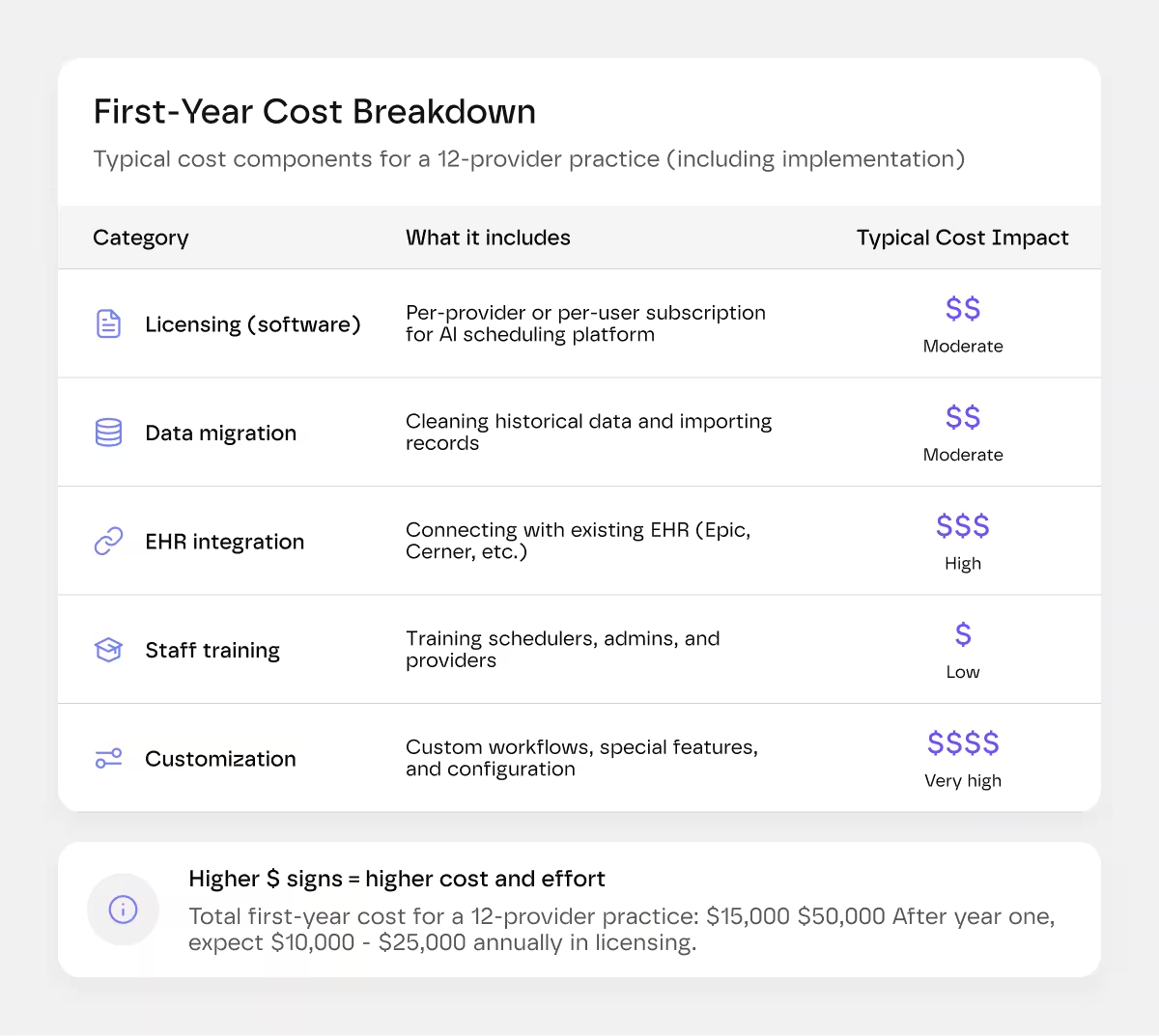
After year one, expect $10,000-25,000 annually in software licensing alone.
If you're curious about how these integrations actually work and what separates good healthcare software from bad, our SaaS development guide breaks down the technical foundations.
Hidden Costs Nobody Talks About
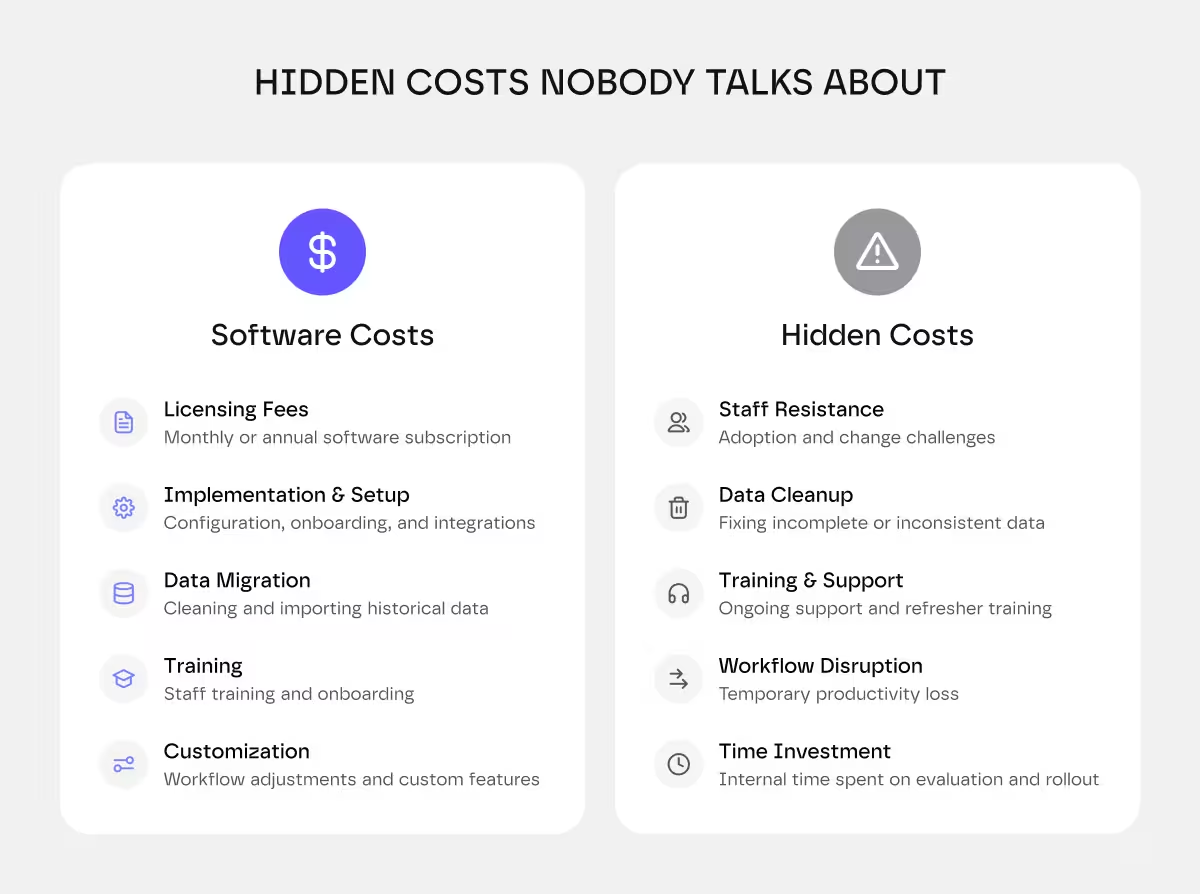
Before you sign a contract of medical scheduling software, budget for more than the software fee.
Brenda at the front desk, who has used the same Excel sheet since 2012, may resist.
Schedulers need real training.
Providers will complain about workflow disruptions, and someone will demand a return to the old system.
But know that a poorly designed interface means your staff struggles longer, adoption stalls, and you don't see the ROI you paid for.
UX matters too. Some vendors offer custom-built interfaces tailored to your specific workflow, which costs more upfront but pays for itself in reduced training burden and faster adoption.
Don't just compare feature lists; test the actual interface. If it feels clunky during a pilot, training costs will be higher and results slower.
Data quality issues hit you upfront, too, if your historical no-show data is messy (unmarked cancellations, duplicate records, wrong appointment types), the AI model performs worse, and cleaning takes hours before you even go live.
You're also betting on vendor survival. If the company gets acquired or shuts down, you lose support, and your integration might break.
Choose established vendors with 5+ years in the market and proven funding over hot startups with great demos.
What else do you get beyond No-Shows
The real power of AI patient scheduling isn't just preventing cancellations.
1. There is better staff utilization
Your team isn't sitting around waiting for patients who don't show. Hygienists stay booked. Providers don't have dead time. This means less overtime and better staff morale.
2. Shorter wait times
When you fill more of your schedule with high-show-probability patients, you reduce cancellations and can run tighter schedules. Wait times drop because you're actually seeing the patients who booked.
3. Smarter overbooking
Some practices intentionally overbook by 10-15% to account for no-shows. AI lets you overbook strategically; it knows which slots can handle double-booking, and which can't.
4. Data you can actually use
The system logs why people cancel. Which time slots have the highest abandonment? Which appointment types correlate with no-shows? Which providers have highest show rates?
You can use this to restructure your schedule, change how you handle certain patient populations, or train your team differently.
How to evaluate vendors
Ask the following questions before you buy:
- What's your model trained on? Industry averages, or your specific data? (Custom training takes longer but works better.)
- How do you handle EHR integration? Real API integration or CSV export/import? (Real integration updates instantly. CSV is a disaster waiting to happen.)
- What's your guarantee? Some vendors promise X% no-show reduction. Get it in writing.
- Can you see the predictions? If the system marks a patient high-risk, can you understand why? (Black-box AI is risky.)
- What happens if I leave? Data export, historical records, integration cleanup.
- Who owns my data? Read the contract. You should own it.
Many vendors offer 30-90-day pilots on a subset of your schedule. Take them to see real results before committing.
Some practices need a custom solution, not an off-the-shelf one. If that's you, here's what Greensighter does differently.
We build HIPAA compliance from day one, not as an afterthought. We design interfaces your staff will actually want to use, which cuts training time in half. Yes, custom costs more upfront. But you recoup it faster because your team isn't fighting the software.
Ready to explore this? Check out our MVP development guide or reach out to talk through your specific needs.
The bottom line
If your no-show rate is above 15% and you have more than six providers, AI scheduling pays for itself within a year. Pull your data, if no-shows cost you $50,000+ annually, this is a financial decision.
If you're a solo practitioner or small group with 1-4 providers, the ROI math is thinner, and the implementation burden is heavier. Skip it unless you have high-value appointments (surgery, implants).
If your no-show rate is below 10%, invest elsewhere.
No-shows cost US healthcare an estimated $150 billion annually. Some loss is inevitable (genuine emergencies), but most is preventable through better scheduling intelligence. Measure your baseline first, then decide.